Spider Solitaire - Card Games
- 4.8
- Rating
- 5.00M
- Installs
- Free
- Price

 Analysis by App-foxy
I find Spider Solitaire - Card Games most appealing when I want a quiet, familiar puzzle that I can start and stop without preparation. It is a free card game from Bluetile, built around the classic spider solitaire format rather than a large collection of unrelated modes. That narrow focus is a strength: the rules are easy to recognize, but arranging cards still gives my attention something useful to do.
After spending time with it, I would describe it as a practical choice for short breaks, relaxed concentration, and anyone who enjoys sorting cards more than chasing a fast score. It is listed for Everyone, supports devices running Android 7.0 or later, and the current version is 2.7.8. The game has attracted over five million installs, with a 4.8 average from around 177 thousand ratings, so it clearly has a broad audience. Those figures are encouraging, but they do not remove the need to ask a more personal question: does its presentation work comfortably for you?
Readable cards and a straightforward route into a game
The main benefit of this title is that its central task is immediately visible. You are dealing with a familiar card layout, and the objective is to organize the cards into completed sequences. I do not need to learn a complicated interface before beginning. For a player returning to solitaire after years away, that low entry barrier matters more than a long feature list.
You May Also Like

 Blood Strike: 2.5 Anniversary
Blood Strike’s Loadouts Turn Every Drop Into a Tactical Gamble
A close look at Blood Strike’s custom loadouts: how fast access to signature weapons reshapes its battle royale rhythm, rewards preparation, and narrows the gap between fights.

 Pandora - Music & Podcasts
Pandora’s Music Is Easy to Start, but Harder to Recover
Pandora’s strength is its low-effort path from a seed to a station. Its weak spot is how much confidence it asks you to place in connection, setup, and quiet recovery.

 8 Ball Pool
 Is Built on Rivalries, Rematches, and Routine
A close look at the rivalries, rematches, shared routines, and unanswered safety questions that turn a quick pool match into a persistent mobile community.

 Samsung Music
’s Quiet Strength Is Playing What You Already Own
Its reach comes less from spectacle than from dependable access to a personal library. That simplicity is both the app’s strongest retention engine and its ceiling.

 AccuWeather: Weather Radar
AccuWeather Review: A Quick, Clear Forecast for Everyday Decisions
For everyday plans, the best forecast is the one you can understand quickly. AccuWeather makes rain timing, radar, and local conditions easy to act on, with a few trade-offs.

 Hill Climb Racing
Why Hill Climb Racing Still Turns Crashes Into One More Run
A tiny car, a bumpy hill and one more upgrade: Hill Climb Racing keeps resurfacing because its simple chaos makes every near-miss feel personal.
More From Our News Desk



Navigation feels most suitable for people who prefer a focused screen. There is no need to move through a social feed, understand a character system, or manage a large inventory before playing. The game’s identity stays close to the table in front of you. That makes it easier to settle into a routine: open it, look at the arrangement, make a move, and continue at your own pace.
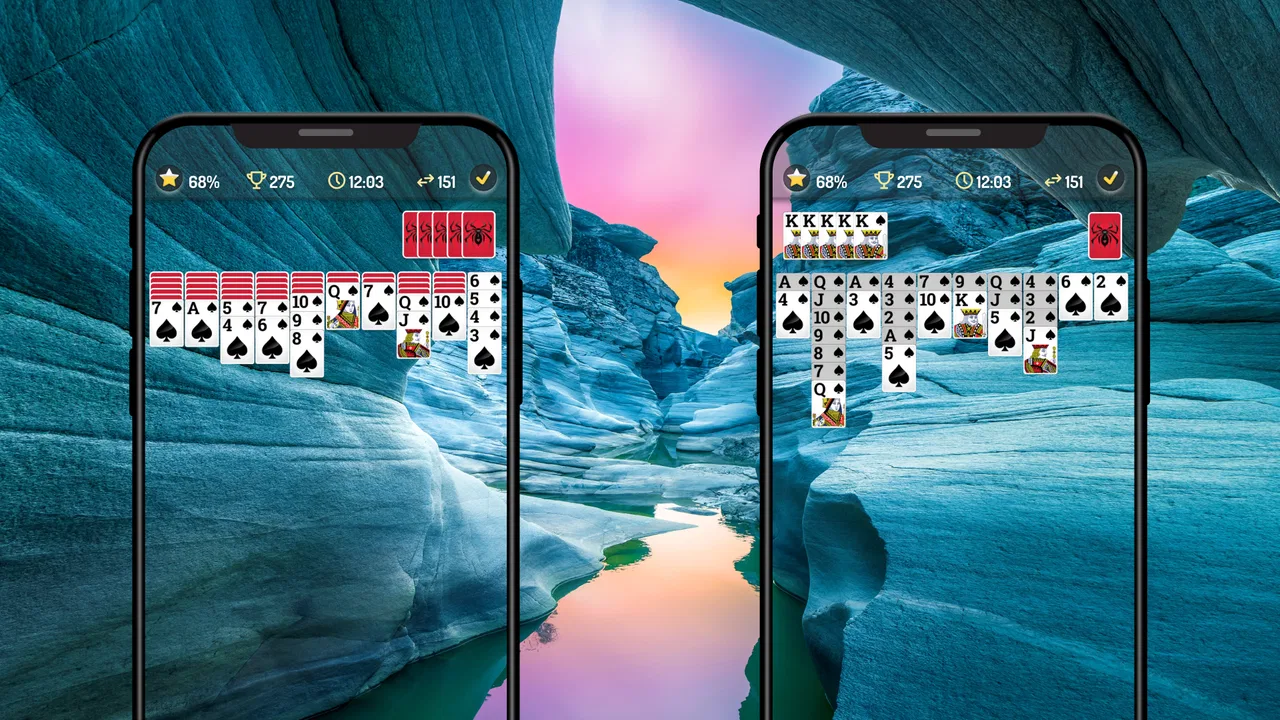
Readability is not only about the size of individual symbols. It also depends on whether the player can quickly distinguish the cards that are available from those covered by other cards. In spider solitaire, that distinction is central to planning. I found that the game is most comfortable when I hold the phone at a steady distance and use a screen large enough for the layout to remain clear without constant squinting.
On a smaller phone, the same arrangement can feel more demanding. The cards occupy a compact space, and a player with reduced vision may need to inspect the screen more carefully before deciding which sequence to move. That is not a flaw unique to this game; it is a structural challenge of playing solitaire on a phone. Still, it means the experience can differ considerably between a compact handset and a larger display.
A useful habit is to pause before making a move instead of tapping quickly through the visible options. This helps in two ways. It reduces accidental selections, and it gives players who process visual information more slowly time to compare the available columns. Spider solitaire rewards that deliberate rhythm, so playing carefully does not feel like fighting the design.
The game is also approachable for people who already know traditional solitaire but have not played the spider variation. The basic idea of building ordered runs is recognizable, while the arrangement creates enough planning to feel different from simply turning over cards one at a time. I would introduce it to a friend as a gentle logic exercise, not as a test of reflexes.
The clearest strength is the low cognitive overhead at the starting line. You can spend your attention on the card problem instead of decoding an elaborate menu. That makes it a good candidate for a short evening wind-down or a few quiet minutes while waiting somewhere, provided the surrounding environment is not too distracting.
How the card structure affects different players
Spider solitaire is often described as relaxing, but the experience changes with the difficulty of the arrangement and with the player’s familiarity with the rules. Someone experienced may scan several possible sequences ahead, while a beginner may simply look for an obvious safe move. Both approaches work, and the game does not require a fast hand to be enjoyable.
That makes it friendlier to players who prefer thinking time over rapid interaction. I would not choose it for a child who wants constant animation or immediate rewards, even though the age classification is Everyone. The rating tells me the content is broadly suitable; it does not mean the game will match every child’s attention span or every family’s idea of entertainment.
For older players, the familiar card format can be reassuring. The challenge is recognizable, and there is no need to understand a fictional world or remember a long sequence of instructions. The main practical question is whether the cards remain comfortable to inspect on the chosen device. A tablet or larger phone can make the layout easier to follow than a small screen.
Touch control, sensory comfort, and everyday situations
From a motor perspective, a card game has one obvious advantage over action games: it does not ask me to react continuously. I can consider a move, touch a card, and wait for the result. That slower pace is useful for players who find rapid swiping tiring or who prefer not to coordinate several controls at once.
At the same time, the layout still asks for accurate touches. Cards can sit close together, especially on a narrow display, and a player with limited fine-motor control may occasionally select the wrong area. I recommend using a stable grip and avoiding rushed taps. If a phone is resting flat on a table, a light touch can be easier to manage than holding it in one hand while playing.
Another practical consideration is hand position. Long sessions can make a phone uncomfortable to hold, even when the game itself is calm. I get a better experience by placing the device down for extended play and using both hands when I need to inspect a crowded layout. This is a simple adjustment, but it can make the difference between a pleasant puzzle and an unnecessarily tiring one.
The visual side deserves equal attention. Card games rely on contrast, spacing, and quick recognition of suits and values. Players with color-vision differences may find some combinations slower to distinguish if they depend heavily on color alone. The safest approach is to test a few rounds in the actual lighting where you expect to play rather than assuming that a clear screen indoors will remain clear outdoors or in a dim room.
Sound can also affect comfort, particularly when the game is used in a shared space. I usually keep my phone quiet when playing in a waiting room, on public transport, or beside someone who is resting. A silent session is also less distracting when the goal is concentration rather than stimulation. The game works well as a visually focused activity in those situations, as long as the player can see the cards without glare.
This is where the title fits naturally into everyday life. I can play a few moves during a short appointment wait, stop when my name is called, and return later without needing to remember a complicated story. At home, it works as a small transition between tasks: instead of opening a fast-paced game that demands immediate attention, I can spend a few minutes sorting sequences and then put the phone away.
That flexibility benefits people whose energy or concentration changes during the day. A player can choose a cautious pace when tired and think more deeply when alert. The game does not force the same level of intensity every time. However, it is still a screen-based activity, so it is not ideal for someone trying to take a complete break from visual stimulation.
Useful habits for a more comfortable session
I would begin with short sessions rather than treating every deal as something that must be finished immediately. This is especially helpful for players who experience visual fatigue or hand discomfort. The card arrangement remains easier to understand when I look away briefly and return with fresh attention.
It also helps to avoid playing in direct sunlight. Reflections can make card details harder to separate, encouraging unnecessary tapping and squinting. Indoors, a moderate light behind or beside the device is usually more comfortable than a completely dark room with a bright screen. These are ordinary adjustments, but solitaire exposes display problems quickly because every card matters.
For players who use larger system text or display scaling, the practical result may vary. Enlarging the phone interface can improve general reading while leaving less room for the card layout. I would check the game after changing display settings and decide which arrangement gives the better balance. A setting that helps menus may not automatically make a dense card table easier to use.
One non-obvious advantage of the game’s slow structure is that it gives me time to build a personal checking routine. Before moving a sequence, I look at what will be uncovered and whether the destination column will remain useful. This reduces impulsive errors and makes the game more approachable for anyone who needs an extra moment to plan. It is also a better way to play than treating every available move as automatically good.
Where it compares well, and where alternatives win
Compared with a basic solitaire app that focuses on one familiar deal style, this spider format feels more like a planning puzzle. The satisfaction comes from arranging related cards and opening space, not merely from turning over a hidden card. I prefer it when I want a little more mental involvement without moving into a full strategy game.
Compared with a collection containing many card variants, Bluetile’s game is more focused. That can be a benefit for someone who already knows they want spider solitaire and does not want to search through a crowded menu. The trade-off is variety. If I want to switch constantly between Klondike, FreeCell, and other formats, a broader card suite may suit me better.
It also differs from competitive puzzle games that emphasize timers, leaderboards, or rapid daily challenges. Here, the appeal is the card arrangement itself. I would recommend it to a player who wants a private, low-pressure activity. Someone motivated mainly by competition may find a more feature-heavy alternative more satisfying.
The free price makes trying it easy, while in-app purchases range from $2.49 to $22.99 per item. That is worth keeping in mind before committing to any optional purchase. I would start with the free experience and decide whether the game genuinely fits my routine before spending money. For a simple card pastime, paying is a personal choice rather than a requirement for understanding its basic appeal.
Who should choose it, and who should skip it
I think this is a strong match for adults who enjoy traditional card puzzles, people looking for a calm way to occupy short breaks, and players who prefer planning to reflexes. It can also work well for someone returning to mobile games after a long absence because the premise is familiar and the learning curve is gentle.
I would be more cautious about recommending it to players who need large, highly customizable visual controls, rely on strong non-visual feedback, or find compact touch targets difficult. The card layout itself creates limits that a different kind of game may avoid. Someone who wants spoken guidance, extensive accessibility settings, or a broad range of input options should examine the experience on their own device before settling on it.
It is also not my first choice for a person seeking a social game, a story-driven adventure, or a constant stream of new content. Its pleasure comes from repeating a focused activity with different arrangements. That repetition is calming for some players and monotonous for others.
Because the developer is Bluetile and the game has already reached over five million installs, it feels like an established option rather than an obscure experiment. I still would not treat popularity as proof of personal suitability. The most important test is simple: can you read the cards comfortably, select them without frustration, and enjoy thinking through a deal at your preferred pace?
My inclusive verdict after using it
Spider Solitaire - Card Games succeeds because it keeps the main interaction understandable. Its classic card format supports slower decision-making, short sessions, and a wide range of everyday contexts. I can play quietly while waiting, stop without losing the thread of a larger story, and return when I feel ready. For many people, that is more valuable than a long list of extra systems.
Its limitations are tied to the same design choice that makes it recognizable. A dense card layout can challenge vision, small screens can make touches less forgiving, and the focused format will not satisfy anyone looking for social features or many different games. Those are meaningful considerations, particularly for players who need stronger adaptation to their preferred way of seeing or controlling a game.
My recommendation is therefore specific rather than universal: try it if you want a free, quiet card puzzle with familiar rules and enough planning to hold your attention. Use a comfortable screen, play at a deliberate pace, and give yourself permission to stop after a few moves. If the cards remain easy to distinguish and the touch interaction feels manageable, Bluetile’s version is a pleasant companion for small pockets of time. If those basics already feel tiring, a solitaire alternative with more display and input customization will probably be the kinder choice.
FAQs for Spider Solitaire - Card Games
01What features does Spider Solitaire - Card Games offer?
Spider Solitaire - Card Games offers multiple difficulty levels to suit both beginners and advanced players. The app includes daily challenges, a hint system, and an undo feature to enhance gameplay. Additionally, it provides customizable themes and card backs, allowing users to personalize their experience.
02Is Spider Solitaire - Card Games free to play?
Yes, Spider Solitaire - Card Games is free to download and play. However, it may include optional in-app purchases and ads. The purchases typically offer additional themes or remove ads, enhancing the gaming experience without necessary expenses for basic gameplay.
03How user-friendly is the app interface?
The app boasts a clean and intuitive interface, making it easy for players of all ages to navigate. The touch controls are responsive, and the layout is organized, ensuring that users can focus on the game without any distractions or confusion.
04Does Spider Solitaire - Card Games require an internet connection?
Spider Solitaire - Card Games can be enjoyed offline, making it perfect for playing on the go without requiring an internet connection. However, some features, such as daily challenges or leaderboard updates, might need internet access to function fully.
05What platforms is Spider Solitaire - Card Games available on?
Spider Solitaire - Card Games is available on both Android and iOS platforms. This cross-platform availability ensures that users can enjoy the game on a wide range of devices, from smartphones to tablets, providing a seamless gaming experience across different operating systems.
Pros
- Intuitive interface with easy navigation.
- Multiple difficulty levels for all players.
- Daily challenges keep the game engaging.
- Offline mode available for uninterrupted play.
- Customizable themes and card designs.
Cons
- Contains ads that can be intrusive.
- Limited hints may frustrate beginners.
- No multiplayer mode available.
- In-app purchases can be pricey.
- Requires frequent updates for new features.

Spider Solitaire - Card Games
Gallery